
LIVESat 17 Oct or Sun 18 Oct · 10 AM–2 PM IST
ANALOG DATAEmbedded, IoT & AI
LIVE ONLINE EDGE AI WORKSHOP

FromAIModelto
Real Hardware.

Take an AI model beyond the notebook. Learn how to deploy, benchmark and choose between CPU, GPU, TPU and NPU hardware using real Edge AI workflows.

  • No hardware required
  • Basic Python is enough
  • 48-hour replay

Built for software · AI/ML · embedded · IoT · robotics engineers

ONNX RuntimeOpenCVRaspberry PiNVIDIA JetsonTensorRTGoogle CoralHailoQualcommMQTTFastAPIINT8 quantizationONNX RuntimeOpenCVRaspberry PiNVIDIA JetsonTensorRTGoogle CoralHailoQualcommMQTTFastAPIINT8 quantization
4hours
live & hands-on
6targets
edge devices compared
13+years
building real systems
48hours
of replay access
Trusted by engineers from organisations includingISROBroadridgeTCSTech MahindraBosch
Before

“My model works in a notebook.”

After 4 hours

“I know how to deploy, benchmark and choose hardware for it.”

Six deployment paths, one vision workload

One vision workload. Six deployment paths. Real-world performance comparisons.

CPU baseline
laptop · Raspberry Pi 5
Sony IMX500
in-sensor AI
Hailo
NPU
Google Coral
TPU · INT8
NVIDIA Jetson
GPU · TensorRT
Qualcomm AI Hub
cloud profiling
The deployment gap

It worked in the notebook. Then you deployed it.

Accuracy is the easy part. The real job starts when the model meets a camera, a power budget and a deadline.

notebook.ipynbon your laptop
In [7]: model.evaluate(test)
accuracy:  98.4%  ✓
loss:      0.043  ✓
# ship it!

“It works.”

edge_device ~ $first deployment
$ python run_edge.py
✗ Unsupported operator: GridSample
⚠ 2.1 FPS  (needed 15+)
⚠ 94°C, thermal throttling
⚠ out of memory

“Now what?”

Illustrative of a typical first deployment.

Latency

A late answer is a wrong answer when the line keeps moving.

Power & heat

Batteries drain and boards throttle long before the demo ends.

Privacy & offline

Video can't always go to the cloud, and networks fail.

Reliability

Duplicate alerts and dropped frames break trust in a day.

The map

This workshop gives you the map from model to action.

  1. 1
    Camera
    frames in
  2. 2
    Preprocess
    resize · normalize
  3. 3
    Inference
    ONNX Runtime
  4. 4
    Post-process
    NMS · confidence
  5. 5
    Event
    MQTT message
  6. 6
    Action
    alert · GPIO

You'll build the complete path, not another isolated prediction demo.

See what you'll learn

Four steps from notebook to a device that acts.

Every step is something you do, measure or decide in the room, not a slide to read.

01

Export

Take a trained model out of the notebook as portable ONNX.

portable!
torch.onnx.export(
  model, x, "vision.onnx")
vision.onnx ready
02

Optimize

See what quantization changes: size, speed and accuracy.

4× smaller
relative model size
FP324×
FP162×
INT81×
FP32 vs INT8 · measured
03

Benchmark

Record the numbers that make a comparison fair.

fair fight
  • input size
  • precision
  • warm-up
  • latency
  • FPS
  • memory
  • thermals
  • power
benchmark worksheet
04

Deploy & act

Run on real devices and turn predictions into events.

it acts!
Raspberry PiIMX500JetsonCoralHailoQualcomm AI Hub
{"event": "person_detected",
 "zone": "A2", "conf": 0.91}
MQTT · API · GPIO
What you walk away with

Six questions you'll finally be able to answer.

You won't “master AI” in four hours. You'll understand the deployment system well enough to make sensible engineering decisions.

  1. 01

    Pick the right silicon

    Explain CPU, GPU, TPU and NPU inference without leaning on vendor marketing, and know when each one wins.

    “Should this run on a Jetson or a Coral?”
  2. 02

    See the full pipeline

    Camera → preprocess → inference → event → action. The whole path, not an isolated demo.

    “How does a prediction become an alert?”
  3. 03

    Run a real ONNX lab

    Follow a laptop-based OpenCV + ONNX Runtime pipeline with confidence filtering and overlays.

    “Can I run this model in real time?”
  4. 04

    Benchmark honestly

    Separate model latency from end-to-end FPS and spot misleading numbers.

    “Is that vendor's FPS number even fair?”
  5. 05

    Choose hardware with confidence

    Score a platform against PPE, inspection, occupancy, robotics or maintenance use cases.

    “What hardware does my project need?”
  6. 06

    Know your next step

    Leave with a roadmap of skills and projects toward production Edge AI.

    “What should I learn and build next?”
The 4-hour agenda

Model. Optimize. Deploy. Act.

One coherent journey from the deployment gap to real hardware selection, with a guided lab you follow on your own laptop. Both batches run 10:00 AM – 2:00 PM IST.

  1. 1
    10:00 → 10:2525 minwhy edge?

    Edge AI & the Deployment Gap

    Edge vs cloud vs hybrid; latency, bandwidth, privacy, offline operation and power.

  2. 2
    10:25 → 10:5530 minno TOPS hype

    CPU, GPU, TPU, NPU & In-Sensor AI

    Architectures, FP32/FP16/INT8, heterogeneous SoCs, in-sensor AI and why TOPS is not enough.

  3. 3
    10:55 → 11:0510 minnot just cameras

    How Models Are Trained, Evaluated & Exported

    The training journey in brief, plus a traditional ML example: vibration → features → model → alert.

  4. 4
    11:05 → 11:5550 minon your laptop

    Guided Build: Model to Real-Time Inference

    OpenCV input, ONNX Runtime, confidence filtering, overlays and honest latency/FPS.

  5. 11:55 → 12:0510 minstretch!

    Break & live audience poll

    The second half adapts to the room: software, AI/ML, embedded or robotics.

  6. 5
    12:05 → 12:5045 minreal boards

    Hardware Showcase: One Workload, Six Paths

    Pi CPU, Jetson, Coral, Hailo and IMX500 demos, plus Qualcomm AI Hub cloud profiling. Each target uses its own supported model format.

  7. 6
    12:50 → 1:2030 minpredictions → events

    From Model Output to Action

    Model outputs → decisions → one working MQTT/API event-to-action pipeline.

  8. 7
    1:20 → 1:4525 minpick your board

    Hardware Selection Challenge

    Interpret benchmarks and choose a platform for PPE, inspection, occupancy, robotics or predictive maintenance.

  9. 8
    1:45 → 2:0015 minwhat's next

    Q&A, Roadmap & Bootcamp Intro

    Learning roadmap, Q&A and an introduction to the 15-day bootcamp.

Hardware you'll see

One workload, six paths.

One vision workload, each target with its own supported model format.

1
Your laptopguided ONNX lab
2
AI Cameravision on-sensor
3
Raspberry Pi 540-pin GPIO!
4
Jetson Nanotiny but mighty
5
Hailo HAT+ 2NPU hat for Pi
6
Coral USB TPU4 TOPS at ~2 W
one workload, six deployment paths
Tools you'll use
  • Python
  • TensorFlow
  • PyTorch
  • MQTT
  • ONNX · OpenCV
Included with your seat

Everything you need to reproduce it afterwards.

Architecture Decision Guide

CPU/GPU/TPU/NPU selection criteria.

Hardware Scorecard

A one-page requirements-driven template.

Benchmark Worksheet

Record latency, FPS, precision and constraints.

Starter Lab / Repository

Laptop-based ONNX and OpenCV pipeline.

48-Hour Recording

Replay the complete workshop while it is fresh.

No board required

The lab runs on your laptop; hardware is demoed live.
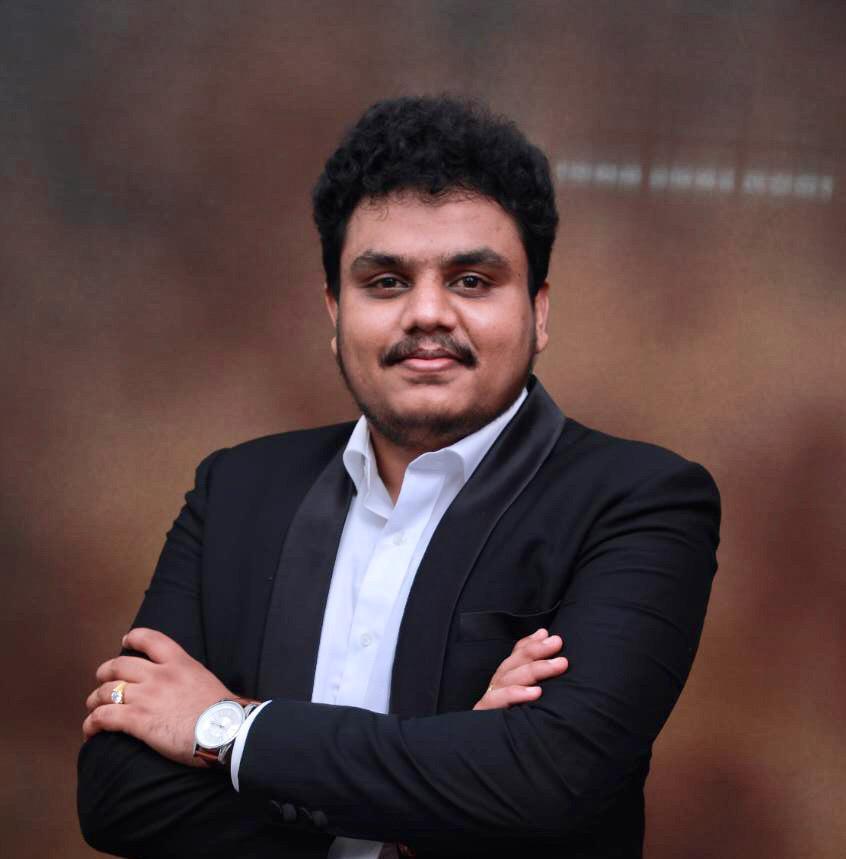
Rajath Kumar K S, founder of Analog Data
Rajath Kumar K S
13+ years
Your instructor

Rajath Kumar K S

Founder of Analog Data · Developer · Corporate Trainer

Software developer and corporate trainer across AI/ML, Python, FastAPI, IoT and embedded systems. Rajath has delivered hands-on training to engineering teams at ISRO and Broadridge, and teaches how models, devices, APIs and production deployment connect.

13+
years building real systems
ISRO · Broadridge
engineering teams trained
Corporate
AI, IoT & embedded training
  • AI · ML · Computer Vision
  • Python · FastAPI · Deployment
  • ESP32 · STM32 · IoT
  • Training for engineering teams
What learners say

Don't take our word for it. Read their messages.

Notes from the inbox and the chat, with the lines that stuck marked up.

AM
Arjun M.
Software Developer, Bengaluru

Hi Rajath, just wanted to say thank you for the Edge AI bootcamp.

Before joining, I thought Edge AI basically meant running a YOLO model on Raspberry Pi. After these 16 days, I understood the complete system: camera input, OpenCV preprocessing, model optimisation, inference, event logic and actually connecting AI output to an application.

The hardware comparisons between Raspberry Pi, Hailo and Coral were especially useful. Very practical sessions. 👍

9:42 PM
Inbox
Edge AI Bootcamp Feedback
AK
Ananya K.
to me · IoT Engineer
Tue, 6:40 PM

Hi Rajath, The biggest value for me was understanding where Edge AI actually fits into an IoT architecture. Earlier, I always assumed intelligence would happen in the cloud. During the bootcamp, seeing how a device can detect an event locally and only send meaningful information to the cloud made the architecture much clearer. The sessions covering OpenCV, Raspberry Pi, accelerators and deployment considerations were particularly useful. I also liked that you discussed limitations instead of only showing perfect demos. Overall, it was a very useful 16 days. Thanks, Ananya K.

ReplyForward
NP
Naveen P.
Engineer transitioning into Edge AI

Sir, the bootcamp gave me a direction for what I should learn next.

I was confused between Embedded, IoT, AI and Computer Vision because everything seemed like a separate field. After these sessions I realised Edge AI sits exactly between these areas.

I'm now building my own camera-based project using Raspberry Pi + OpenCV as my portfolio project. The 16 days were completely worth it for the clarity alone.

8:18 PM
Inbox
Feedback on the 16-Day Edge AI Bootcamp
VH
Vijay H.
to me · Embedded Engineer
Mon, 8:15 AM

Hi Rajath, I wanted to share my feedback after completing the Edge AI Bootcamp. I come primarily from an embedded systems background, so AI deployment used to feel like a completely different world to me. The bootcamp helped me connect embedded systems, computer vision and AI together. What I liked most was that we didn't stop with model training. We discussed deployment constraints, cameras, preprocessing, inference hardware, latency and how the final system should take an action. The three-hour sessions were detailed, but the hands-on demonstrations made the concepts much easier to understand. Thanks for putting together such a practical program. Regards, Vijay H.

ReplyForward
KR
Karthik R.
Electronics Engineer, Chennai

When I joined I was honestly worried that Edge AI would be too advanced for me because I had never worked with AI accelerators before.

But starting from the fundamentals and slowly moving into Raspberry Pi, cameras, OpenCV, inference and hardware made it much easier.

By the end I could actually understand what Hailo, Coral TPU, NPU, quantisation and inference mean instead of just hearing those terms online. 😄 Thank you sir.

10:05 PM
DN
Dsouza N.
Embedded/IoT Developer, Pune

The thing I appreciated most was getting to see multiple Edge AI platforms instead of only slides.

Raspberry Pi, Coral TPU, Hailo and different cameras all made much more sense when you demonstrated where each one fits.

I had watched many YouTube videos about TOPS and accelerators before, but I never really understood how to choose hardware for an actual application. This bootcamp cleared that confusion.

6:55 PM
PS
Priya S.
ML Engineer, Hyderabad

I already knew Python, OpenCV and basic deep learning before joining, but most of my experience was inside notebooks.

This bootcamp completely changed how I look at Edge AI. Now when I think about an AI project, I think about the entire pipeline: camera → preprocessing → inference → event → API/action.

The Hailo and Coral demonstrations were my favourite part. This was much more practical than another ML course.

7:20 PM
Inbox
One of the Most Practical AI Programs I've Attended
SB
Suresh B.
to me · Senior Software Engineer
Wed, 11:30 AM

Hi Rajath, I've attended several AI and machine-learning programs, but most of them concentrated heavily on training models. What made this Edge AI bootcamp different was the engineering perspective. The discussions around latency, hardware selection, optimisation, cameras, deployment architecture and real-world constraints were extremely useful. I particularly liked comparing different approaches instead of treating Raspberry Pi as the answer to every Edge AI problem. The 16-day format gave enough time to understand the concepts properly rather than rushing through everything in a weekend. Best wishes, Suresh B.

ReplyForward
Inbox
My Experience With the Edge AI Bootcamp
MJ
Meera J.
to me · AI/Embedded Engineer
Thu, 9:10 AM

Hi Rajath, Before joining the program, my understanding of Edge AI was mostly limited to running pretrained models on small devices. After attending the 16-day bootcamp, I now understand that building an Edge AI system involves much more than the model itself. From image acquisition and OpenCV preprocessing to inference, optimisation, hardware accelerators, application logic and deployment, the program connected all the pieces together. What I appreciated most was the emphasis on engineering decisions and practical demonstrations rather than just theory. For anyone coming from software, AI, embedded systems or IoT who wants to understand how real Edge AI products are built, this program provides a very good foundation. Thank you for the excellent sessions. Regards, Meera J.

ReplyForward
Reserve My Seat
Is this for you?

Built for people who build things.

If you can read a little Python, you can follow along. No electronics, soldering or owning a board required.

Python & backend engineers

See how models actually ship to real devices.

ship it

AI / ML engineers

Move beyond notebooks and benchmark honestly.

benchmark it

Embedded & IoT engineers

Add on-device AI to what you already build.

add AI

Robotics & vision developers

Choose accelerators for real-time vision.

pick your chip

CSE · ECE · EEE students

Get a clear roadmap into Edge AI engineering.

start here
All you need
that's it!
  • Basic Python
  • A laptop with a browser
  • No board required
  • No electronics or soldering
What this is not
nope.
  • A prompt-engineering webinar
  • A claim you'll “master AI” in four hours
  • A hardware sales pitch
  • A vendor certification
  • A course needing five boards first
Reserve your seat

One live session. A whole new way to ship AI.

Pick the date that fits your week, 10:00 AM – 2:00 PM IST. The same workshop runs on each date.

  • 4 hours of live, hands-on teaching
  • Guided ONNX + OpenCV lab on your laptop
  • Live demos on Pi, Jetson, Hailo, Coral & Qualcomm
  • Decision guide, hardware scorecard & benchmark sheet
  • Starter repository + 48-hour recording
  • Full ₹499 credited toward the bootcamp

Choose your batch

SEATS OPEN
Workshop fee
₹499.00
GST · 18%
₹89.82
Round off
+ ₹0.18
Total
₹589
Reserve Batch 1 · ₹589
  • + GST
  • No hardware required
  • Basic Python is enough
  • 48-hour replay
  • Credited to the bootcamp

Secure checkout · confirmation by email

What ₹499 gets you

Everything you need to deploy with confidence.

  • 4 hours live

    With a practitioner, not a recording

  • Guided practical lab

    OpenCV + ONNX Runtime on your laptop

  • 6 hardware platforms compared

    One workload, measured honestly

  • Decision framework

    Choose silicon by constraints, not TOPS

  • Benchmark worksheet

    Latency, FPS, precision and power

  • Starter repository

    The lab pipeline to build on

  • 48-hour replay

    Revisit the whole session

  • ₹499 credited to the bootcamp

    If you choose to continue

One wrong accelerator or development board can cost more than the entire workshop.

Frequently asked

Before you reserve.

Still unsure? Message us on +91 96633 53992 or email us.

The dates cover the same workshop: Batch 1 runs on Saturday, 17 October 2026 and Batch 2 runs on Sunday, 18 October 2026. Choose whichever suits you; the content is identical.

Bootcamp credit

Your ₹499 isn't spent. It's credited.

Loved the workshop? Continue into the Analog Data bootcamp and the full workshop fee is deducted from your tuition, during the enrollment window announced in the session.

Step 1 · Today
Live Edge AI Workshop
₹499
workshop fee · 4 hours live · 48-hour replay
  • Guided ONNX + OpenCV lab
  • Live demos on real hardware
  • Decision guide + starter repo
Step 2 · If you continue
Analog Data Bootcamp
Bootcamp tuition
₹12,499 + GST
Workshop credit
− ₹499
You pay
₹12,000 + GST

Credit applies to pre-tax tuition within the announced window.

  • Try the teaching first, with zero extra cost if you continue
  • Credit applied to pre-tax tuition
  • No pressure: the workshop stands on its own

Your model works in a notebook. Now make it work on real hardware.

17 or 18 October 2026 · 10 AM–2 PM IST · ₹499 + GST

Reserve My Seat — ₹499 + GST

48-hour replay · bootcamp credit · secure checkout

₹499
+ GST · Sat 17 Oct or Sun 18 Oct
Reserve Seat